
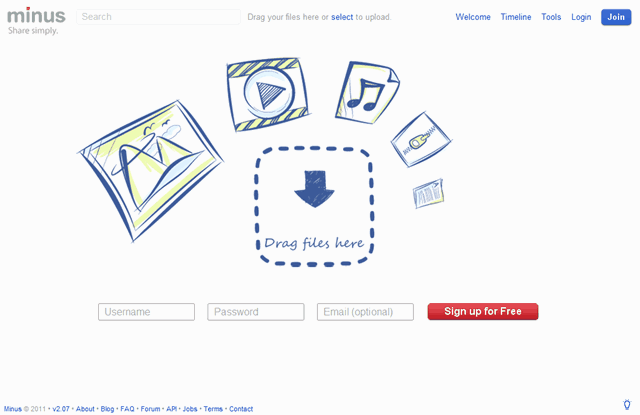
Min.us 新一代圖片空間,拖曳相片至瀏覽器立即產生相簿

by Pseric on 2010/10/25分類:免費空間, 圖片空間

新一代的圖片分享服務 Min.us,帶給使用者全新的體驗。不同於一般圖片上傳空間,你只要將瀏覽器打開,連入 Min.us ,再將照片拖曳到網頁裡,就會自動上傳到網路並產生相簿鏈結,非常方便,每個人都能夠輕鬆上手。目前 Minus 只有支援 JPEG, JPG, GIF, PNG, APNG 及 BMP 圖片檔,往後可能也會支援文件、影片、音效等其它格式的檔案。

進入 Min.us,不會看到「瀏覽」按鈕、或是要求使用者選取檔案,唯一你要做的事就是把照片拖曳到瀏覽器裡,如果你想上傳超過一張以上的相片,也可以按著 CTRL 或 SHIFT 鍵,在以滑鼠一次選取多張圖片並拖曳進 Min.us。

支援單檔 7MB 以下的圖片,每個相簿裡不超過 50 張(但確切的檔案保存時間網站上並未提及)。

2010-10-25-[2]

圖片就會立即上傳,右方可以設定相簿標題、調整照片順序,注意到下方的兩個鏈結嗎?這兩個鏈結相當重要,一個是作為編輯用(Edit)、另一個則是分享用(Viewer),如果你想看看相片在 Min.us 裡顯示的實際情況,可以參考以下範例:

範例相簿:http://min.us/mve8LBK

2010-10-25-[4]

更棒的是在圖片下方還有直接鏈結(Link to image),可以方便你將上傳後的圖片貼到其它網站或是部落格裡。如果你想打包一次下載所有相簿內的照片,只需要點擊右方的”Download Gallery”即可。

網址:Min.us(http://min.us/

  • http://twitter.com/darksebastian 蛭魔妖二

    这个图床很不错啊
    效果也不错
    直接拖拽 貌似不能传大于7MB的文件
    不过也没说具体的保存时间呢

    • http://about.me/pseric Pseric

      對,有 7MB 的限制,也沒寫檔案保存時間,稍後補上! :-)

  • Pingback: Tweets that mention Min.us 新一代圖片空間,拖曳相片至瀏覽器立即產生相簿 — 免費資源網路社群 -- Topsy.com

  • Pingback: Min.us 新一代圖片空間,拖曳相片至瀏覽器立即產生相簿 « Cxyi's Blog

  • http://nonsense.twera.com nonsense

    可惜沒有上傳記錄
    變成要手動記下網址了~~

    不過還滿方便的!

  • http://nonsense.twera.com nonsense

    BTW, 目前只支援
    Min.us is optimized for Firefox , Chrome , Safari on Mac , and IE 9 .

  • http://min.us John Xie

    Da jia hao,

    Wo sh John Xie, co-founder of Minus. I was born in Shanghai, China and speak mandarin chinese fluently, however my chinese writing is very poor. Just wanted to give a quick update to the readers here :)
    We have made great progress over the past week fixing bugs and adding new features based on user-feedback, as that is our #1 Priority.

    Please be sure to subscribe to our http://blog.min.us and join http://feedback.min.us
    You may also email me personally at john@min.us

    Some of the new features we implemented so far in the past 1 week alone includes:

    - Increased upload limit to 7MB Per image and added more image type support
    - Ability to download entire gallery in Zip format with 1-Click.
    - Full Safari browser on Mac support with drag-drop function
    - Auto-resizing of larger images for smoother gallery viewing experience, but still keeping the original size for direct image link
    - Added display of upload progress, image size and dimensions under each image in gallery.

    We also have Login & Registration + Image/Uploads tracking in the works for this week so we’ll keep everyone updated.
    Again thanks for the awesome feedback so far and keep spreading the word and sending us your suggestions!

    Follow us on http://twitter.com/mindotus
    Subscribe to http://blog.min.us

    John @ Min.us http://Min.us

    • http://twitter.com/darksebastian 蛭魔妖二

      just followed U on twitter

  • 小郭

    真的是超方便的啦!!
    以往的舊方法都可以拋棄了XD
    話說那隻無尾熊真面善…

    • http://bowp.org.ru

      贊成無尾熊很面善

  • http://www.acgso.com 灰機仔

    FAQ里有保存时间的介绍的:
    How long do you keep the images?

    We currently keep all images indefinitely unless deleted by the uploader or if it goes against our terms of service.

  • MidoriG

    請問這個網站有所謂"帳戶"的形式嗎?

    • http://about.me/pseric Pseric

      如同上面開發者所說,他們在本週正著手進行 登入 & 註冊 功能的研發。
      往後應該會陸陸續續有更多的功能加入,拭目以待囉!

      (如果要掌握最新情形,可以追蹤他們的Twitter、或訂閱 RSS)

  • Cat

    上傳的圖片能不能刪除的?我找半天沒看到“Delete”……

    • http://about.me/pseric Pseric

      由於目前還沒有帳戶機制,所以沒辦法刪除圖片。

      如果你非得刪除的話,請在 http://min.us/pages/contact 找到他們的聯繫方式,以 E-mail 告知他們你要刪除的內容即可。

  • Yuki

    超酷的啦 且頁面簡潔又好看:)

  • 深邃孤雲

    沒想到開發者會來留言阿

    哈哈

  • Pingback: join.me 超簡易遠端桌面分享、操控軟體! — 免費資源網路社群

  • http://howar31.blogspot.com/ howar31

    這沒有帳戶系統他怎麼知道哪些人擁有哪些圖片的管理權?囧
    如果用Cookie暫存的話以後要修改都很麻煩

    • http://howar31.blogspot.com/ howar31

      留言才發現上面有Co-founder的留言:P
      期待完善的功能

  • http://min.us John Xie

    Da jia hao

    My name is John Xie, co-founder of http://Min.us
    Just a quick update. We have successfully added support for Chinese simplified and traditional, so you can now upload images with foreign language names and edit gallery titles as well!

    Be sure to send us any suggestions to http://feedback.min.us
    Also please subscribe to http://blog.min.us

    Cheers
    John @ Min.us
    http://Min.us

Previous post:

Next post: